Rethinking Receipt and Invoice Processing with AI

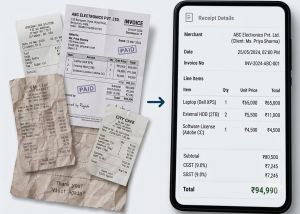
Recently, we conducted a study to test the various OCR solutions for receipt and invoice processing.
Our goal was not just to see which tool was able to read text from an image, it was actually to see which approach would work most effectively with real documents, including faded receipts, unclear totals, different layouts, long line-item lists, and files uploaded in several formats.
We tested OpenAI GPT-5.2, Google Gemini 3.5 Flash, AWS Textract, GLM-OCR, and PaddleOCR, comparing their extraction quality, how they handled poor images, file support, cost, implementation effort, and maintenance requirements. What became clear during the study was that receipt processing is not only an OCR problem. Reading the text is just one part of the job, it is understanding exactly what the text represents that is often the harder part.
Why we conducted the study
Traditional OCR solutions tend to work quite well when the documents are clean and follow a predictable layout. However, real receipts are seldom as consistent. For example, users may upload documents that are:
- Blurred or photographed at an angle
- Faded, folded, or partly damaged
- Printed using different layouts
- Missing clear labels
- Filled with many line items
- Available as images, PDFs, documents, or spreadsheets
We wanted to see whether the newer AI models could handle these situations more effectively (while keeping cost and implementation effort reasonable). Of particular interest were fields like merchant name, date, tax, total, invoice number, and line items, as these often require manual correction in situations where traditional OCR fails.
Reading text is not the same as understanding a receipt
A receipt can contain several dates and many different amounts. There could be a subtotal, tax, discount, rounding adjustment, card payment amount, and a final total. A traditional OCR tool may be able to read every number but still may not understand which one to be saved as the total.
We see the same issue with line items. The system needs to actually understand which price belongs to which product, where discounts apply, and where one row ends and another begins. Simply being able to read product names and prices is not enough for our purposes.
This was one of the clearest findings from our study: Traditional OCR primarily recognises visible text, whereas AI-based models can consider the text, layout, and the surrounding context together.
Or in simple terms:
Traditional OCR reads the document. AI-based OCR tries to understand it.
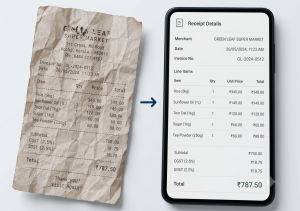
OCR text against corresponding AI extraction
The solutions we tested
OpenAI GPT-5.2
GPT-5.2 performed strongly across the sample receipts. It handled merchant details, dates, taxes, totals, and line items consistently, even including receipts with unclear layouts. The main strengths we observed with GPT-5.2 were:
- A strong understanding of receipt and invoice structure
- Good performance on messy images
- Broad file-format support
- No OCR infrastructure to host
- Flexible extraction rules
- Relatively low implementation and maintenance effort
File support became an important factor in our evaluation. GPT-5.2 could work with images, PDFs, Word documents, spreadsheets, text files, and CSV files with less custom conversion work.
Its main limitation is common to AI-based extraction in general: it may occasionally infer the wrong value. For that reason, validation is still essential.
Google Gemini 3.5 Flash
Gemini 3.5 Flash also performed very well in the tests, its receipt understanding being comparable to GPT-5.2. Additionally, its estimated processing cost was actually slightly lower.
Its main strengths were:
- Strong image understanding
- Good performance on unclear receipts
- Lower estimated API cost
- No hosting requirement
- Similar implementation effort for image and PDF processing
File support was the main issue here. Gemini does well with images, text, and PDFs, but Word and Excel files may require conversion before processing.
It is important to note that this does not make Gemini a poor option. It simply means that a cheaper model may still require more development work around it. That was one of the practical lessons from this study: the lowest API price does not always result in the lowest overall implementation cost.
AWS Textract
AWS Textract is a tool designed specifically for documents such as invoices, receipts, and forms. Its main advantages were:
- Lower per-page processing cost
- Predictable pricing
- No hosting requirement
- OCR-style confidence scores
- Good fit for clean, structured documents
It, however, did not demonstrate the same consistency with messy receipts, line items, dates, and totals that it did with more cleaner ones. Therefore, we see it as a useful option for clean documents or as part of a fallback process, but not as the strongest choice where varied receipt quality is the main concern.
GLM-OCR
GLM-OCR was tested as a locally hosted option. Its main attraction is that there is no per-document API fee, and it could also be suitable where local processing or data privacy is a strict requirement.
However, it requires hosting, deployment, monitoring, and maintenance. Furthermore, we observed issues with field mapping and line-item extraction in the initial tests (for example, values could be read correctly but assigned to the wrong field).
We consider GLM-OCR as a possible future option rather than the simplest starting point.
PaddleOCR
PaddleOCR is a mature open-source OCR solution and can also be hosted locally.
It is quite useful for text recognition, but more engineering work is needed to convert the OCR output into accurate receipt fields. For messy documents, it may still need additional rules, post-processing, or a separate AI model to interpret the extracted text.
Similar to GLM-OCR, it offers greater control but also creates more operational work.
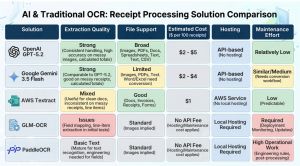
Comparison chart
What we observed during testing
We processed a few sample receipt images through each solution.
GPT-5.2 and Gemini 3.5 Flash successfully handled all of the samples. Both were able to identify the required fields and organise line items more consistently.
The other solutions produced mixed results. We observed cases where dates were missed, line items were grouped incorrectly, totals were not identified, and text was extracted but assigned to the wrong field. Poor-quality images also reduced extraction accuracy.
A most useful lesson learned from this test was that line-item understanding is often harder than basic text recognition. A tool could correctly read the merchant name and date yet still fail to organise the purchased items correctly. For many receipt-processing use cases, that difference matters.
The missing-total test
We also created a more difficult test. The final total was hidden from one receipt, but the individual line items remained visible.
The traditional OCR tools could not provide the total as it was not in the image. GPT-5.2 and Gemini 3.5 Flash, on the other hand, were able to calculate the final total based on the line items in the image.
This was a useful example of the difference between recognition and understanding. The AI models did not simply look for a field labelled “Total”. Rather, they used the relationship between the line items to derive the value.
This ability can be particularly useful when faced with damaged or otherwise unclear receipts. However, the need for validation stands – inferred values should never be accepted without checks. The system should clearly identify when a value was calculated rather than directly read from the document.
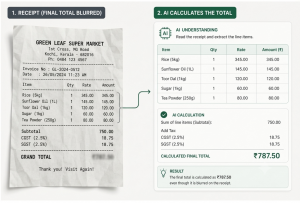
Receipt with the total hidden against AI calculated total
Where AI-Based OCR adds the most value
Based on our study, AI-based OCR is most useful in a few specific areas.
Messy or low-quality images
Users rarely upload perfectly scanned photos. More often than not, they take quick photos with shadows, folds, blur, or uneven lighting. AI models handled these situations more consistently than traditional OCR solutions in our tests.
Different document layouts
Receipts and invoices do not follow one standard format. AI models can adapt to different positions for totals, dates, taxes, and line items without requiring a separate template for every document type.
Line-item extraction
This was one of the most important areas in our evaluation.
Item names may be shortened, prices may appear in different columns, and discounts may be mixed into the list. AI models were better at understanding these relationships.
Total and tax identification
Receipts can contain several similar amounts. AI has the ability to effectively use labels and layout to distinguish subtotal, tax, discount, and final payment.
Missing or unclear fields
AI can sometimes derive a missing value or interpret a field with an unclear label (while this is useful, we once again emphasize the need for validation and manual review).
Multiple file types
Document processing is very often broader than receipt images. Depending on the provider, the same workflow may need to support PDFs, Word documents, spreadsheets, text files, and CSV files.
This became one of the deciding factors in our final recommendation.
Practical use cases we identified
The study also helped us look beyond basic receipt scanning.
Automatic receipt and invoice entry
A user uploads a document, and the system extracts the relevant details: merchant, date, tax, total, invoice number, and line items. This has the advantage of reducing manual data entry and speeding up document processing.
Expense categorisation
Receipts can be automatically grouped into relevant categories: groceries, fuel, travel, medicine, food, electronics, utilities, etc.
Invoice tracking
The system can identify due dates, supplier details, invoice amounts, and payment information, which could in turn help users track unpaid invoices and upcoming deadlines.
Natural-language search
Once the document has been understood, users can search using ordinary questions such as “Show grocery receipts from last month”, “Find all fuel expenses”, “How much was spent on medicine?”, “Show invoices above ₹5,000”, and so on.
Duplicate detection
Merchant name, date, total, and line items can all be compared to identify documents that may have been uploaded more than once.
Document summaries
Long invoices can be converted into short summaries containing important information such as the supplier, total, tax, due date, and purpose.
Error detection
The system can flag situations where:
- Line items do not match the total
- The tax looks incorrect
- A date is invalid
- A required field is missing
- The currency is unclear
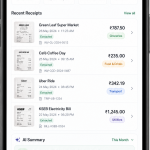
A dashboard with relevant info
Rough cost estimates
We also prepared an indicative cost comparison. The rough estimates from the study were:
- Google Gemini 3.5 Flash: approximately $2–$4 per 100 receipts
- OpenAI GPT-5.2: approximately $2–$5 per 100 receipts
- AWS Textract: approximately $1 per 100 images or pages
- GLM-OCR and PaddleOCR: no direct API charge, but hosting and maintenance are required
These figures are only planning estimates. They should not be treated as fixed prices.
Actual cost can vary based on many factors:
- Image resolution and file size
- Receipt length
- Number of line items
- Amount of information extracted
- Model settings
- Prompt and response size
- Validation and retry attempts
- Document volume
- Need for additional processing
At first glance, local OCR models may appear free because there is no per-document API fee. However, the full cost must also take into consideration the infrastructure, monitoring, deployment, scaling, updates, and engineering effort.
For an initial implementation, an API-based model may therefore be the more economical choice overall.
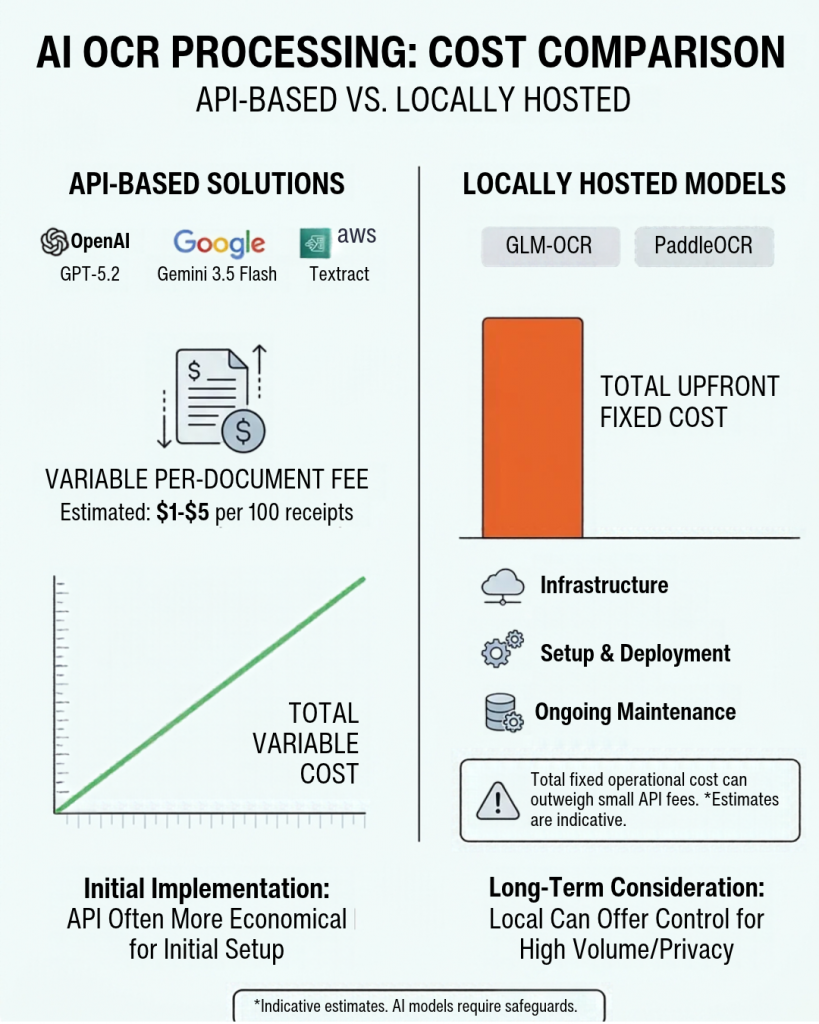
Cost comparison
What surprised us most
There were a few findings that stood out most during the study.
The first was how well both GPT-5.2 and Gemini 3.5 Flash handled varied receipt layouts. Their performance was not limited to reading text; they were able to interpret the structure of the document.
Another was the importance of line-item extraction. Basic fields such as merchant name and date were not always the hardest part, correctly organising products, quantities, discounts, and prices was often more challenging.
The third was the role of file support. Two models may perform similarly on receipt images, but the better choice can change when users also need to upload Word documents or spreadsheets.
Finally, we found that a local model without API fee does not automatically become the cheapest option. Factors such as infrastructure and maintenance can easily outweigh small per-document processing costs.
AI extraction still needs safeguards
Although AI-based models performed well, we would not recommend relying on the model response alone. AI can occasionally return an incorrect value, miss a line item, infer information that is not present, produce an inconsistent structure, or provide an unreliable confidence score.
A reliable workflow should therefore, include the following:
- A fixed output format
- Required-field checks
- Subtotal, tax, and total validation
- Date and currency validation
- Retry handling
- Manual review for uncertain documents
- Storage of the original file
- Logging for future improvement
The system should also be able to distinguish between values read directly from the document and values inferred or calculated by the model.
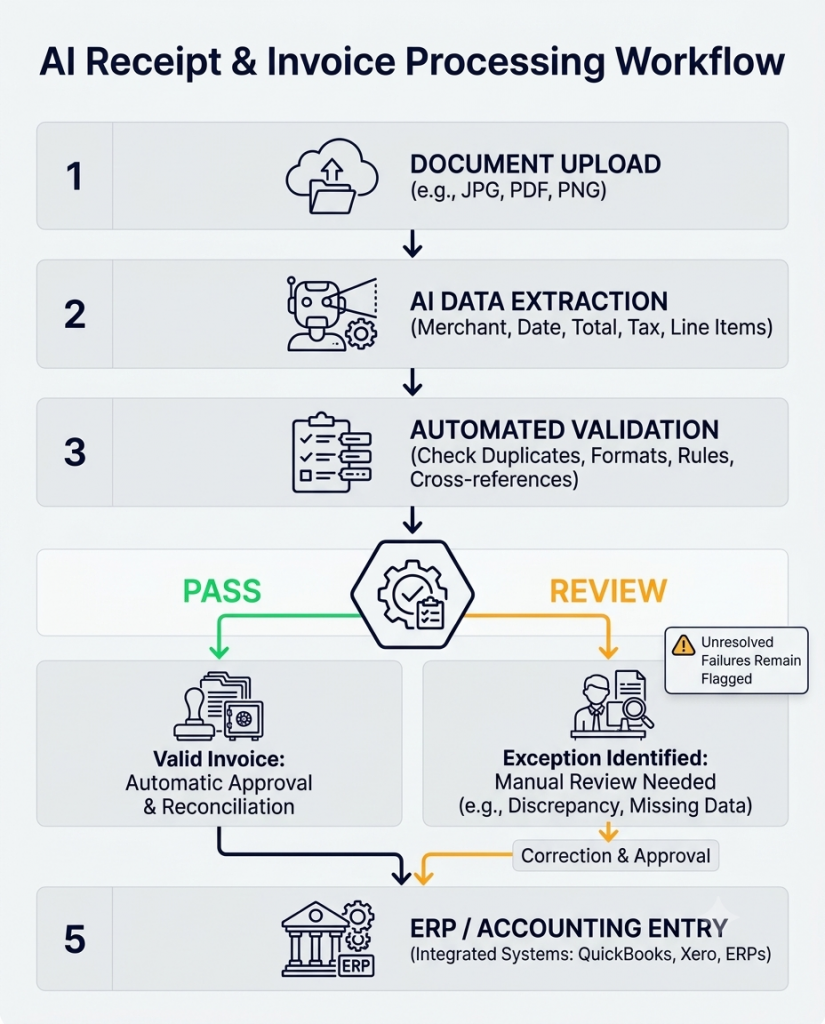
Workflow illustration
Our recommendation
As you can observe from the study, GPT-5.2 and Gemini 3.5 Flash offered the best overall blend of quality, flexibility, and implementation effort. Both handled all the tested receipts successfully, including the case of the missing-total.
We would use GPT-5.2 as the primary option where broad file support is important. It can handle the required image, PDF, document, spreadsheet, text, and CSV formats with less custom conversion work.
Gemini 3.5 Flash remains a strong alternative. Its estimated processing cost is also slightly lower, and it performed at a similar level on the receipt images. It becomes especially attractive when the input is limited mainly to images and PDFs.
AWS Textract may still be useful for clean, structured documents where lower cost and OCR-style confidence scores are priorities, while GLM-OCR and PaddleOCR are worth reconsidering when local hosting, privacy, or infrastructure control becomes more important than implementation simplicity.
We would also caution against tying the entire system to one provider. A common extraction layer makes it easier to switch between GPT, Gemini, or another service later.
A note on the AI models
AI models evolve at a rapid pace. GPT 5.2 is no longer the latest option, and newer models are poised to offer better accuracy, image understanding, structured extraction, and cost efficiency.
Before implementation, care must be taken to ensure that the latest suitable models are tested again using the same real-world receipts and invoices. The system should also remain flexible so that newer models can be adopted without major changes.
Final thoughts
Our study confirmed that receipt and invoice processing is no longer only about recognizing printed characters.
Modern AI models can understand document structure, organise line items, identify totals and taxes, and handle (some) incomplete information, which makes them more suitable for the variety of documents users submit in real situations.
For clean and predictable documents, traditional OCR remains relevant, but when the requirement includes messy images, changing layouts, accurate line items, and multiple file types, AI-based OCR provides a more practical foundation.
The strongest way forward is not replacing everything with AI, but rather, combining AI extraction with validation, fallback handling, manual review, and a flexible system design. This balance gives us better accuracy without giving up control.

2004 - 2026 © LiteBreeze AB
